Reset Network Settings With the GFiber App
Use this feature only if you want to reset all your network settings to their original values. After a reset, any custom settings you have created will be lost and can't be recovered.

Warning: This action permanently deletes all custom Wi-Fi names (SSIDs), passwords, port forwarding rules, and static IP configurations. These settings cannot be recovered once the reset is complete.
Use the GFiber Mobile App
Before you begin, ensure your mobile device is connected to the internet (via cellular data or your GFiber network) and that you are logged into the GFiber App.
- Navigate to Network Settings: Open the GFiber App and tap Network, then select Network settings.
- Access Advanced Options: Tap Advanced network settings to reveal hidden configuration controls.
- Select the Router: Tap Edit router settings to target your primary network gateway.
- Initiate Reset Sequence: Locate the Reset router settings section and tap Reset router settings.
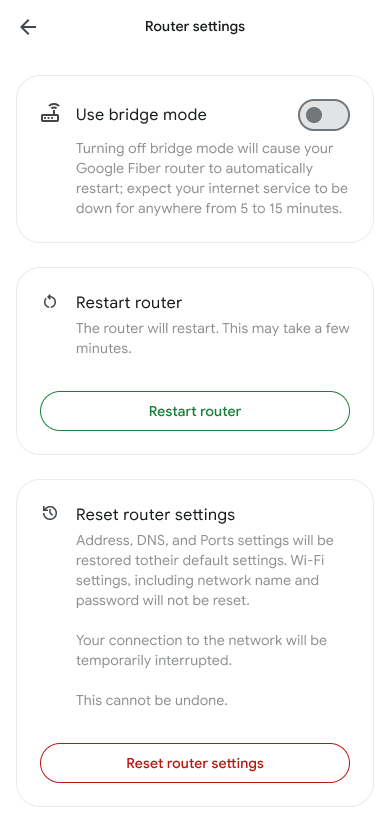
- Confirm the Factory Reset: In the warning alert pop-up, touch Reset one last time. Your router will reboot, and all network settings will return to original factory values.